


Simplifying network security policy management inside Cisco Meraki's Dashboard.
TIMELINE
September - December 2023
ROLE
Product design intern
TEAM
SKILLS
Figma, Product Design, User Research, Prototyping, A/B Testing, Business Thinking
SUMMARY
I designed the org-wide IPS/IDS experience for the Meraki Dashboard, replacing a manual, platform-hopping setup with one IT teams could configure natively and deploy across every network at once.
Identified the Scalability Gap
Traced why IPS/IDS configuration lived on a separate platform and couldn't scale across an organization's networks.
End-to-End Design
Took the work from early direction through high-fidelity wireframes, ready for engineering handoff.
Cross-Functional Buy-In
Presented final designs to cross-functional teams and leadership to move the work forward.
THE PROBLEM
Two platforms. One confusing, frustrating workflow.
Configuring IPS/IDS across an organization meant cross-launching to a separate platform, Cisco Umbrella, then repeating the setup network by network — a workflow that large enterprises found inconvenient and confusing.
How can we integrate IPS/IDS configuration within the Meraki Dashboard to create a more cohesive, scalable, and user-friendly interface?
AUDITING BOTH APPROACHES
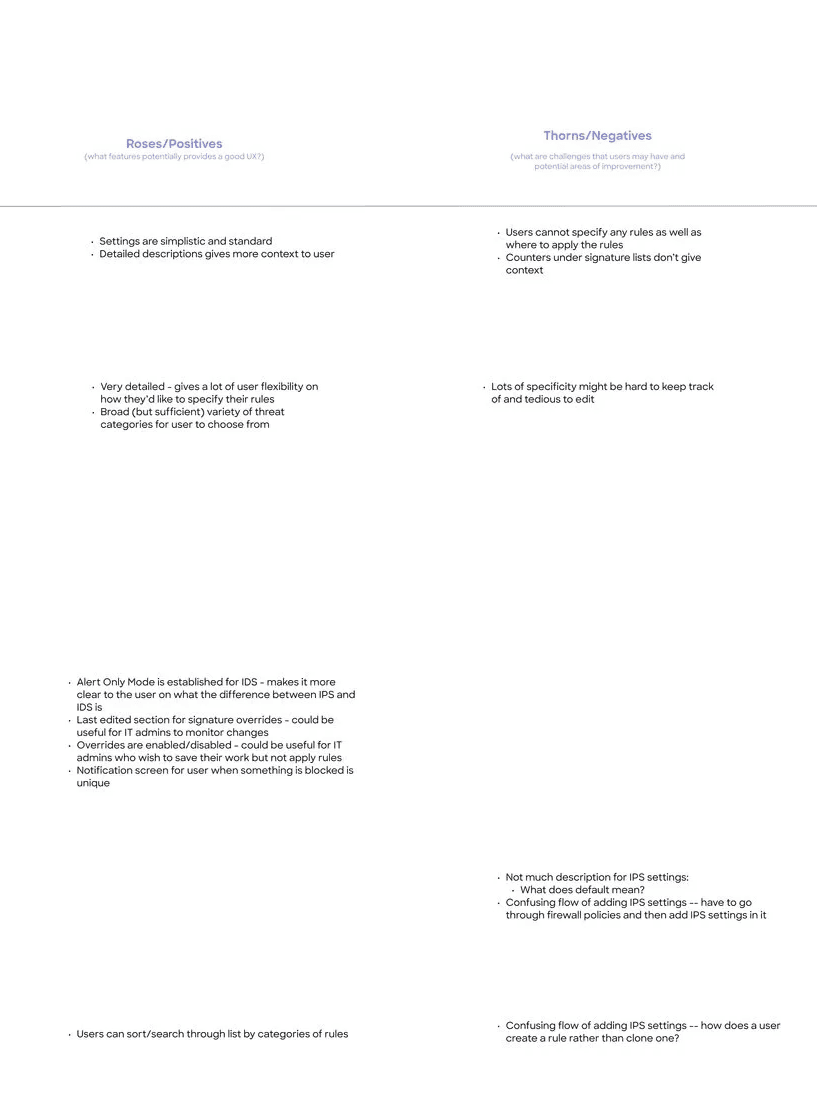
I studied how seven competitors handled IPS/IDS configuration, screenshotting each approach and running a roses-and-thorns analysis to separate what worked from what didn't.
VLAN & VRF Configuration
Users want to segment traffic entering the MX device for compliance and isolation, but can't, because VRFs aren't supported.
Routing
Users want to direct traffic to specific destinations, but VRF's isolated routing table forces workarounds like Auto VPN, route leaking, or BGP and OSPF.
The question to address became clear:
How might we empower network architects and implementers to seamlessly manage traffic segmentation and routing, while overcoming the limitations of VRF support?
LOTS AND LOTS OF DESIGN ITERATIONS…
A cycle of design ideation, review, design ideation, and review continued. Adjustments to each design were made each time I discovered something new and important about IPS/IDS settings. Each iteration felt like I was getting closer and closer to the page that reflected an efficient solution to the problem.

USABILITY TESTING
I ran two usability sessions with internal stakeholders who knew the product and IPS/IDS deeply.
A/B Testing:
I had two different designs of the feature that I wasn't sure what resonated best with our users. Halfway through the usability test, we switched the interface to a different version to get feedback on which design they thought was more user-friendly.

Version A: Signature list and details section were collapse-able dropdowns. (chosen)

Version B: Signature list were radio button selections and details opened a right-side drawer.
Notable feedback:
“I think my favorite part is showing what we log, block and ignore. [This is] something we don't show today for the [Meraki dashboard].” - P1
"(in response to customization screens) This resolves the problem customers might have [where] a signature [is] triggering a lot and blocking traffic that is a false positive.” - P2
FINAL DESIGN KEY FEATURES

Selecting an existing signature list
Built to feel familiar to stakeholders already used to Umbrella's signature lists — while removing the need to ever swivel to a separate platform.

Creating a custom signature list
Gives teams in-depth customization, with category-based sorting that makes managing dozens of signatures fast instead of tedious.

Selecting networks to apply changes to
Deploys IPS configuration across every network in an organization at once, replacing what used to be manual, network-by-network setup.
NEXT STEPS
Folding IPS settings into Advanced Security Profiles as a standalone component
Reviewing every screen against Magnetic design system and accessibility guidelines
Handing off to engineering for development
TAKEAWAYS
Complex projects can take time to digest and concept – utilize time and resources around you wisely.
Ask help from others asap. The sooner you connect with the team, cross-functional partners, and internal stakeholders, the better!
Don’t be afraid to explore and share ideas!
